Azure DevOps user story
Before You Move That Azure DevOps User Story to Active, Ask These Questions
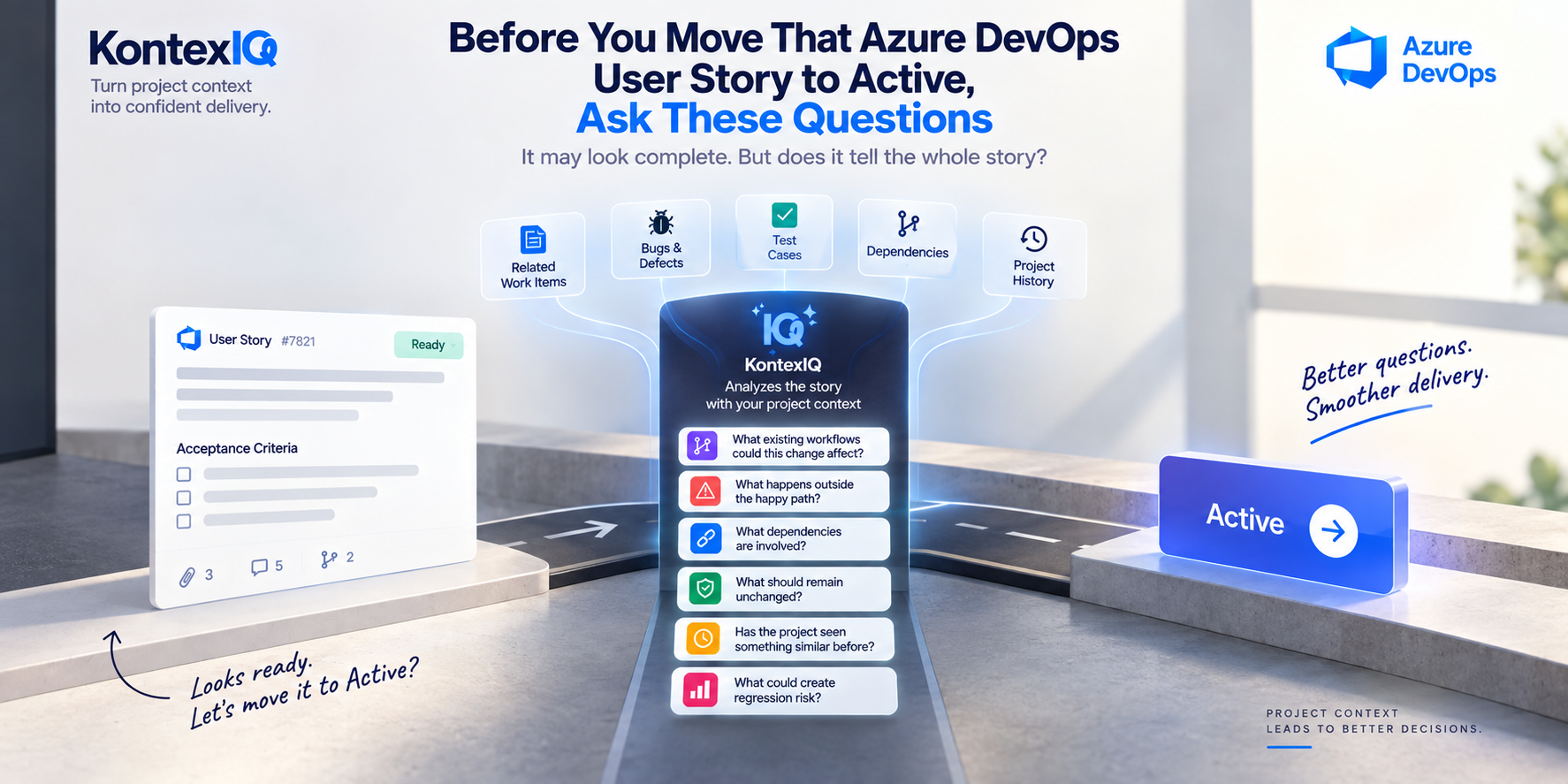
A user story can look ready for development.
The description explains the request.The acceptance criteria describe the expected outcome.The team understands the happy path.
So the story moves to Active.
But “well written” and “well understood” are not always the same thing.
Before development begins, there may still be questions hiding outside the story:
What existing workflows could this change affect?
What happens when something goes wrong?
Which systems or features does it depend on?
What current behavior needs to remain unchanged?
Has the project dealt with something similar before?
What could this change unintentionally break?
Before moving a story forward, it is worth challenging what the story doesn't say.
A Story Can Be Clear and Still Miss Important Questions
Consider an Azure DevOps user story:
“Allow customers to save multiple delivery addresses and select one during checkout.”
The acceptance criteria might say:
- Customers can add multiple delivery addresses.
- Customers can edit or delete a saved address.
- Customers can select a saved address during checkout.
- The selected address is used for the order.
At first glance, the requirement seems clear.
But development could quickly surface additional questions:
- What happens if a customer deletes the address currently selected for an open order?
- Is there a maximum number of addresses a customer can save?
- Should one address be marked as the default?
- Can customers use addresses from countries the store doesn't currently ship to?
- Does changing an address affect shipping options or delivery charges?
- What happens to previously placed orders if a saved address is edited?
- Are there existing checkout rules that this feature must preserve?
None of these questions automatically makes the story bad.
They simply show that a requirement can describe the expected feature without describing every interaction around it.
And some of the answers may already exist elsewhere in the project.
Six Questions to Ask Before Moving a Story to Active
Instead of reviewing only whether the story has a description and acceptance criteria, examine how it fits into the product around it.
1. What Existing Workflows Could This Change Affect?
Features rarely operate completely on their own.
For the saved-address story, the obvious feature is address management.
But the change could also affect:
- Checkout
- Shipping eligibility
- Delivery charges
- Order confirmation
- Customer account settings
A story can work exactly as described and still create unexpected behavior somewhere connected to it.
Before development begins, ask:
What already depends on the part of the product we're changing?
2. What Happens Outside the Happy Path?
Acceptance criteria often describe what should happen when everything works as expected.
Real usage is rarely that simple.
Suppose another story says:
“Allow users to upload profile images.”
The happy path is straightforward: choose an image, upload it, and display it.
But what happens when:
- The file is too large?
- The format isn't supported?
- The upload is interrupted?
- The image can't be processed?
- The user uploads a new image while an earlier upload is still being processed?
These scenarios don't need to turn every story into an exhaustive specification.
But asking about them can reveal behavior the team should agree on before implementation.
3. What Dependencies Are Involved?
A requirement can look self-contained while relying on other parts of the system.
Consider:
“Show customers the real-time status of their delivery.”
The interface may seem simple.
But the feature could depend on:
- A logistics provider
- Order-status data
- Background updates
- Notification services
- Mapping or tracking integrations
If one of those dependencies is delayed, unavailable, or returns unexpected information, what should the product do?
Identifying dependencies early can change both the requirement and the implementation approach.
4. What Existing Behavior Must Remain Unchanged?
Requirements naturally focus attention on what's new.
But software teams also need to protect what already works.
Imagine a story that says:
“Allow administrators to edit a user's role.”
The new behavior may be clear.
But existing authorization rules could make the change more complex.
Should changing a role immediately affect an active session?
What happens to permissions associated with the previous role?
Are there actions that certain administrators must never be allowed to perform?
Sometimes the most important requirement isn't what needs to change.
It's what must not change accidentally.
5. Has the Project Seen Something Similar Before?
Project history can provide useful clues about a new requirement.
Suppose the team is working on:
“Allow customers to apply a promotional code during checkout.”
A previous bug may show that discounts were incorrectly applied to already-discounted products.
An earlier story may define whether multiple promotions can be combined.
An existing test may capture how promotions interact with minimum-order requirements.
Those details may not appear in the new story.
But they could change the questions the team asks about it.
Past work can contain lessons that the current requirement hasn't repeated.
6. What Could Create Regression Risk?
A story can meet all of its acceptance criteria and still affect something outside its immediate scope.
Consider:
“Allow customers to change the date of an upcoming booking.”
The date change itself may work perfectly.
But what else depends on that date?
Availability?
Pricing?
Cancellation rules?
Notifications?
Resource allocation?
Calendar integrations?
The relevant question isn't only:
“Does the new functionality work?”
It's also:
“What existing functionality could this change affect?”
That is where regression thinking starts before testing begins.
Project Context Makes These Questions More Specific
These six questions can be asked manually.
The difference comes when the review can use what the Azure DevOps project already knows.
Consider this story:
“Allow customers to change the date of an upcoming booking.”
A review based only on the story might ask:
“Should customers receive confirmation after changing the date?”
Useful—but generic.
Now imagine the project contains:
- A previous bug involving price changes after rescheduling
- An existing test for cancellation windows
- A related work item defining availability rules
- A dependency on an external scheduling service
The review can now raise much more specific questions:
“A previous defect shows that rescheduling could retain the old price. Should the requirement define whether pricing is recalculated when the booking date changes?”
Or:
“Existing cancellation rules are based on the booking date. Should those rules be recalculated after rescheduling?”
The AI isn't simply generating more questions.
The project is helping determine which questions are worth asking.
Story Analysis Should Challenge, Not Certify
There is an important distinction here.
The purpose of story analysis isn't to produce a label:
READY
or:
NOT READY
Real requirements are rarely that simple.
One story may contain an unresolved question that blocks implementation.
Another may contain an uncertainty the team deliberately decides to handle later.
The decision belongs to the team.
A useful analysis should instead help expose:
- Missing behavior
- Unclear assumptions
- Relevant dependencies
- Negative scenarios
- Existing behavior at risk
- Areas worth investigating
The result isn't a verdict.
It's a better conversation before development starts.
Catch the Question Before It Becomes Rework
Suppose a requirement doesn't explain what should happen when an external service is unavailable.
If the team identifies that question before development, they can discuss the expected behavior and update the requirement.
If the same uncertainty appears after implementation, the team may need to revisit the requirement, modify the implementation, update tests, and validate the behavior again.
Not every unanswered question becomes a defect.
But unresolved assumptions can become expensive once implementation is built around them.
That's why pre-development analysis shouldn't be another approval gate.
It should be an opportunity to challenge assumptions while they're still easier to change.
Where KontexIQ Fits
This is where KontexIQ's Analyze User Story capability fits.
KontexIQ helps teams examine a user story alongside relevant project knowledge to surface questions, gaps, dependencies, assumptions, and potential risks before development begins.
Instead of asking only:
“Is anything missing from this story?”
the team can explore:
“Given what our project already knows, what should we think about before building this?”
KontexIQ doesn't need to make the readiness decision for the team.
The team still decides which questions matter, what needs clarification, and when the story should move forward.
The purpose of the analysis is to give that decision a better foundation.
Not another readiness checklist. A more informed way to challenge the story.
Before “Active,” Make Room for Better Questions
Moving a story to Active is easy.
Understanding what the story means inside an existing product is harder.
A good description and clear acceptance criteria are important—but they may not reveal every dependency, negative scenario, regression risk, or existing behavior affected by the change.
So before development begins, don't ask only:
“Does this story look complete?”
Ask:
“What does our project already know that could change how we understand this story?”
That question can uncover something worth clarifying before code is written.
Because the goal isn't simply to move work forward.
It's to move forward with fewer hidden assumptions.
Frequently Asked Questions
1. What should I check before moving an Azure DevOps user story to Active?
Look beyond whether the description and acceptance criteria are present. Consider affected workflows, negative scenarios, dependencies, existing behavior that should remain unchanged, previous issues, related work, and potential regression areas.
2. Can AI analyze an Azure DevOps user story before development?
Yes. AI can help identify questions, assumptions, dependencies, missing scenarios, and potential risks. When relevant project information is available, the analysis can also reflect knowledge surrounding the specific requirement.
3. How is user story analysis different from a readiness checklist?
A checklist typically verifies whether expected information or conditions are present. Story analysis examines the requirement more deeply, challenges assumptions, and helps surface questions that may require discussion.
4. Should AI decide whether a user story is ready for development?
The team should make that decision. AI can support it by surfacing relevant questions and information that may otherwise be overlooked.