Azure DevOps project context
Your Azure DevOps Project Knows More Than Your User Story Does
A user story can look complete and still leave important questions unanswered.
The title is there.
The description is there.
The acceptance criteria may be there too.
But is that everything the team knows about the requirement?
Usually, it isn't.
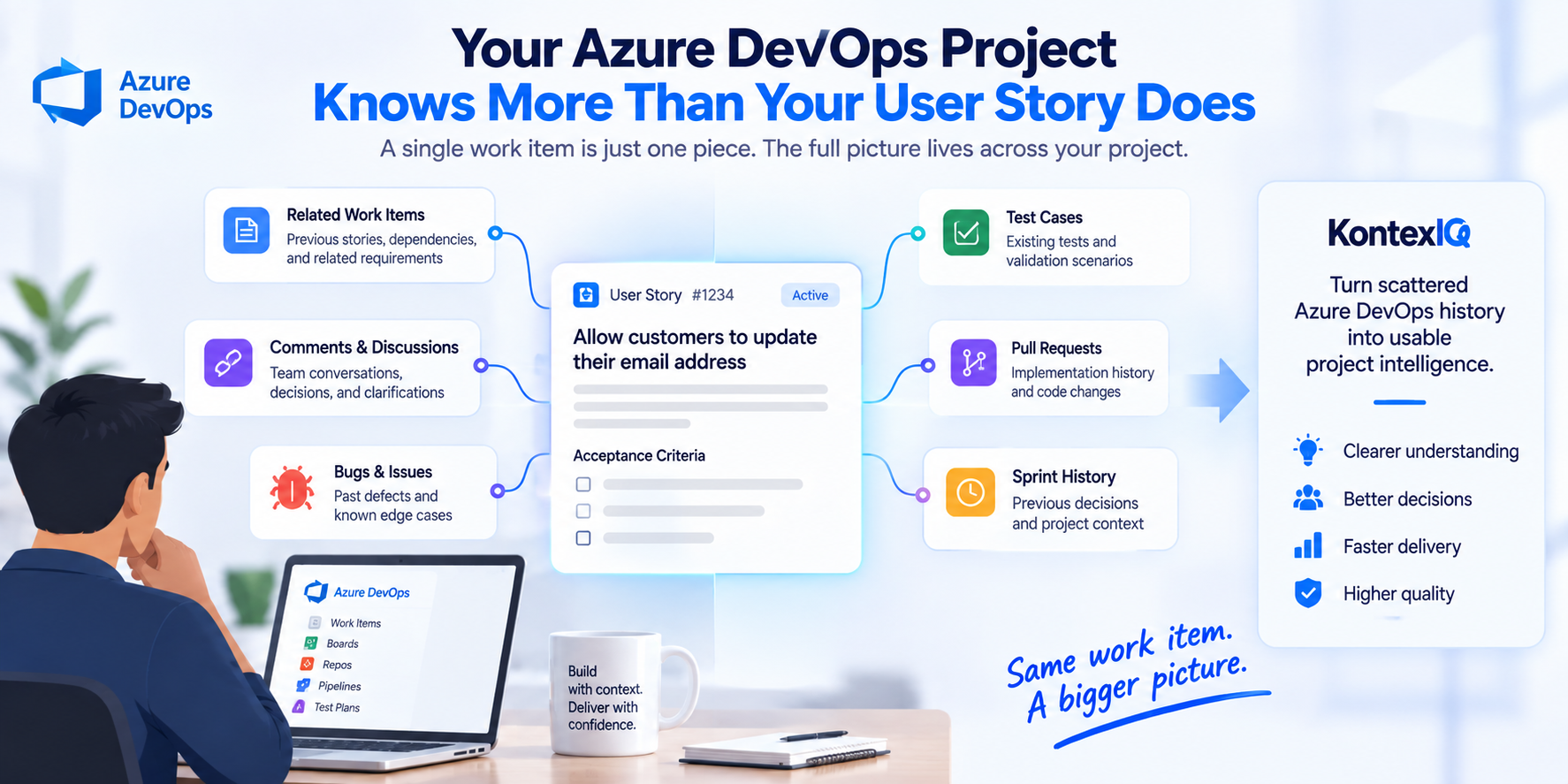
In Azure DevOps, relevant information around a work item can be spread across related work items, comments, bugs, test cases, pull requests, previous discussions, and decisions made earlier in the project.
The work item captures the task.
The project contains the story behind the task.
And when that surrounding knowledge becomes easier to access, teams can understand new work without having to reconstruct the history from scratch.
The Work Item Is Only One Piece of the Requirement
Consider a simple Azure DevOps work item:
“Allow customers to update their email address.”
At first glance, it seems straightforward.
But before someone starts implementing or testing it, several questions may matter:
- Is email also used as the customer's login identifier?
- What happens if the new email already belongs to another account?
- Does the new email need to be verified?
- Are there security restrictions around the change?
- What happens to active sessions?
- Are authentication or notification services affected?
- Has similar functionality caused issues before?
- What tests already exist around this behavior?
The current work item may not contain all those answers.
But that doesn't mean the answers don't exist.
They may already be somewhere else in the project.
The problem isn't always missing information. Sometimes, it's distributed information.
Project History Can Change the Meaning of a Work Item
Now imagine that the email-change requirement is connected to other information in Azure DevOps.
A related story establishes that email is also used as the customer's login identifier.
A previous bug shows that unverified email changes caused account-access issues.
An existing test case requires verification before the new email becomes active.
A pull request from an earlier authentication change shows how active sessions were handled.
A previous discussion explains why duplicate email addresses must be rejected.
Now look at the original work item again:
“Allow customers to update their email address.”
The sentence hasn't changed.
But your understanding of it has.
What initially looked like a simple profile update now involves authentication, verification, security, existing behavior, and validation.
That's the difference project history can make.
The work item tells you what needs to change.
The surrounding project knowledge can help explain what that change actually means inside the product.
The Real Cost Is Rediscovering What the Project Already Knows
When a developer, QA engineer, BA, or Product Owner encounters an unanswered question, they often have to go looking for the missing information.
They search related work items.
Check previous bugs.
Look for existing tests.
Review earlier implementations.
Read comments.
Ask someone who remembers why a decision was made.
Sometimes the answer is easy to find.
Sometimes it takes time.
And sometimes a reasonable assumption is made because the relevant history isn't discovered at all.
The workflow can become:
Read the work item → Search for context → Investigate history → Ask around → Reconstruct understanding → Continue the work
The information may already exist.
The team simply has to rediscover it.
That's where scattered project history becomes a delivery problem rather than just an information-management problem.
More Data Isn't the Same as Better Context
The answer isn't to surface everything in Azure DevOps every time someone opens a work item.
More information doesn't automatically create better understanding.
The useful question is:
Which project information actually matters to the work happening right now?
For an authentication requirement, an unrelated bug from years ago may add noise.
But a previous defect involving the same authentication flow could reveal an important risk.
A random test case may not help.
But an existing test for the same behavior could reveal a business rule missing from the current acceptance criteria.
A previous work item may be irrelevant.
But one involving the same dependency could explain why the system behaves the way it does.
That's the distinction between simply having project data and being able to use it intelligently.
Project intelligence isn't about collecting everything. It's about connecting what matters.
From Azure DevOps History to Project Intelligence
Every software project builds history over time.
Requirements capture intended behavior.
Bugs reveal where things went wrong.
Tests capture expected behavior.
Related work shows how functionality evolved.
Implementation history can provide clues about technical decisions.
Comments and discussions may preserve reasoning that never made it into the final requirement.
Individually, these are project artifacts.
When the relevant pieces can be connected to the work happening now, they become something more useful:
Project intelligence.
Instead of thinking only in terms of:
Work Item → Work
teams can move toward:
Work Item + Relevant Project Knowledge → Better Understanding → Better-Informed Decisions
The work item remains the starting point.
It simply doesn't have to carry the entire history of the product inside it.
The Work Item Doesn't Need to Contain Everything
One solution might seem obvious:
Why not put all of this information directly into the user story?
Because that creates a different problem.
If every work item has to contain every previous decision, related bug, implementation detail, dependency, and testing consideration, requirements quickly become difficult to write and maintain.
The goal shouldn't be to make every work item enormous.
It should be to keep the requirement focused while making relevant surrounding knowledge easier to access when it matters.
The work item doesn't need to contain everything.
The team needs a way to access what matters around it.
Where AI Can Change the Workflow
AI creates an opportunity to approach this differently.
Instead of asking only:
“What does this user story say?”
a more useful question can be:
“What does our Azure DevOps project already contain that is relevant to this user story?”
Now the objective isn't simply to summarize the current work item.
It's to connect the requirement with relevant project knowledge that can help the team understand it.
That might include related requirements, dependencies, previous bugs, existing tests, implementation history, or decisions that affect the current work.
The goal isn't for AI to make decisions for the team.
It's to reduce the effort required to reconstruct knowledge the project may already contain.
Where KontexIQ Fits
This is the idea behind KontexIQ's approach to project intelligence.
Rather than treating a work item only as isolated text, KontexIQ uses relevant project knowledge to help teams better understand the work in front of them.
That can include requirements, related work, dependencies, bugs, tests, project history, and other information available within the connected project environment.
The starting point changes from:
“Here is the work item.”
to:
“Here is the work item—and the relevant project knowledge that can help us understand it.”
That understanding can then support what happens next:
Understand the requirement → Identify gaps → Refine the requirement → Carry the understanding forward → Validate the work
The objective is straightforward:
Turn scattered Azure DevOps history into project intelligence the team can actually use.
Your Azure DevOps Project Already Knows More
Every sprint adds knowledge to a project.
Every bug adds another lesson.
Every test captures expected behavior.
Every decision adds to the history behind the product.
But when that knowledge remains scattered across individual artifacts, teams may have to reconstruct it whenever related work appears.
So the next time you open an Azure DevOps work item, don't ask only:
“What does this story say?”
Ask:
“What does the project already contain that matters to this work?”
Because the work item may describe the task.
The project can help explain the story behind it.
And turning that history into usable project intelligence can give teams a better place to start.
Frequently Asked Questions
1. Why isn't an Azure DevOps work item always enough?
A work item can capture the current requirement, but relevant information may also exist elsewhere in the project. Related work items, bugs, tests, dependencies, implementation history, comments, and previous decisions can all affect how a requirement should be understood.
2. What kind of Azure DevOps information can provide useful project context?
Depending on the project setup, useful information can include related work items, bugs, test cases, dependencies, comments, pull requests, implementation history, and previous project decisions.
3. Does project context mean giving AI all of our Azure DevOps data?
Not necessarily. Useful project intelligence is about identifying information relevant to the work being performed rather than treating every available artifact as equally important.
4. How can project intelligence help software teams?
Project intelligence can help teams surface relevant history, understand dependencies and existing behavior, identify requirement gaps, recognize previous issues, and make better-informed decisions without manually reconstructing the same project knowledge each time.